

15个常用的MySQL使用管理命令示例
以下的文章主要向大家描述的是15个MySQL使用管理命令的描述,我前两天在相关网站看见15个MySQL数据库使用管理命令的资料,觉得挺好,就拿出来供大家分享,望大家浏览之后会有所收获。
How to change the MySQL root user password # MySQLadmin -u root -ptmppassword password 'newpassword' # MySQL -u root -pnewpassword Welcome to the MySQL monitor. Commands end with ; or g. Your MySQL connection id is 8 Server version: 5.1.25-rc-community MySQL Community Server (GPL) Type 'help;' or 'h' for help. Type 'c' to clear the buffer. MySQL> How to check whether MySQL Server is up and running # MySQLadmin -u root -p ping Enter password: MySQLd is alive3. How do I find out what version of MySQL I am running Apart from giving the ‘Server version’, this command also displays the current status of the MySQL server. # MySQLadmin -u root -ptmppassword version MySQLadmin Ver 8.42 Distrib 5.1.25-rc, for redhat-linux-gnu on i686 Copyright (C) 2000-2006 MySQL AB This software comes with ABSOLUTE *** NO WARRANTY. This is free software, and you are welcome to modify and redistribute it under the GPL license Server version 5.1.25-rc-community Protocol version 10 Connection Localhost via UNIX socket UNIX socket /var/lib/MySQL/MySQL.sock Uptime: 107 days 6 hours 11 min 44 sec Threads: 1 Questions: 231976 Slow queries: 0 Opens: 17067 Flush tables: 1 Open tables: 64 Queries per second avg: 0.254. What is the current status of MySQL server # MySQLadmin -u root -ptmppassword status Uptime: 9267148 Threads: 1 Questions: 231977 Slow queries: 0 Opens: 17067 Flush tables: 1 Open tables: 64 Queries per second avg: 0.25The status command displays the following information: Uptime: Uptime of the MySQL server in seconds Threads: Total number of clients connected to the server. Questions: Total number of queries the server has executed since the startup. Slow queries: Total number of queries whose execution time waas more than long_query_time variable’s value. Opens: Total number of tables opened by the server. Flush tables: How many times the tables were flushed. Open tables: Total number of open tables in the database. 5. How to view all the MySQL Server status variable and it’s current value # MySQLadmin -u root -ptmppassword extended-status +-----------------------------------+-----------+ | Variable_name | Value | +-----------------------------------+-----------+ | Aborted_clients | 579 | | Aborted_connects | 8 | | Binlog_cache_disk_use | 0 | | Binlog_cache_use | 0 | | Bytes_received | 41387238 | | Bytes_sent | 308401407 | | Com_admin_commands | 3524 | | Com_assign_to_keycache | 0 | | Com_alter_db | 0 | | Com_alter_db_upgrade | 0 |6. How to display all MySQL server system variables and the values # MySQLadmin -u root -ptmppassword variables +---------------------------------+---------------------------------+ | Variable_name | Value | +---------------------------------+---------------------------------+ | auto_increment_increment | 1 | | basedir | / | | big_tables | OFF | | binlog_format | MIXED | | bulk_insert_buffer_size | 8388608 | | character_set_client | latin1 | | character_set_database | latin1 | | character_set_filesystem | binary | skip..... | time_format | %H:%i:%s | | time_zone | SYSTEM | | timed_mutexes | OFF | | tmpdir | /tmp | | tx_isolation | REPEATABLE-READ | | unique_checks | ON | | updatable_views_with_limit | YES | | version | 5.1.25-rc-community | | version_comment | MySQL Community Server (GPL) | | version_compile_machine | i686 | | version_compile_os | redhat-linux-gnu | | wait_timeout | 28800 | +---------------------------------+---------------------------------+
7. How to display all the running process/queries in the MySQL database # MySQLadmin -u root -ptmppassword processlist +----+------+-----------+----+---------+------+-------+------------------+ | Id | User | Host | db | Command | Time | State | Info | +----+------+-----------+----+---------+------+-------+------------------+ | 20 | root | localhost | | Sleep | 36 | | | | 23 | root | localhost | | Query | 0 | | show processlist | +----+------+-----------+----+---------+------+-------+------------------+You can use this command effectively to debug any performance issue and identify the query that is causing problems, by running the command automatically every 1 second as shown below. # MySQLadmin -u root -ptmppassword -i 1 processlist +----+------+-----------+----+---------+------+-------+------------------+ | Id | User | Host | db | Command | Time | State | Info | +----+------+-----------+----+---------+------+-------+------------------+ | 20 | root | localhost | | Sleep | 36 | | | | 23 | root | localhost | | Query | 0 | | show processlist | +----+------+-----------+----+---------+------+-------+------------------+ +----+------+-----------+----+---------+------+-------+------------------+ | Id | User | Host | db | Command | Time | State | Info | +----+------+-----------+----+---------+------+-------+------------------+ | 24 | root | localhost | | Query | 0 | | show processlist | +----+------+-----------+----+---------+------+-------+------------------+8. How to create a MySQL Database # MySQLadmin -u root -ptmppassword create testdb # MySQL -u root -ptmppassword Welcome to the MySQL monitor. Commands end with ; or g. Your MySQL connection id is 705 Server version: 5.1.25-rc-community MySQL Community Server (GPL) Type 'help;' or 'h' for help. Type 'c' to clear the buffer. MySQL> show databases; +--------------------+ | Database | +--------------------+ | information_schema | | MySQL | | sugarcrm | | testdb | +--------------------+ 4 rows in set (0.00 sec) Note: To display all tables in a database, total number of columns, row, column types, indexes etc., use the MySQLshow command that we discussed in our previous articles. 9. How to Delete/Drop an existing MySQL database # MySQLadmin -u root -ptmppassword drop testdb Dropping the database is potentially a very bad thing to do. Any data stored in the database will be destroyed. Do you really want to drop the 'testdb' database [y/N] y Database “testdb” dropped # MySQL -u root -ptmppassword Welcome to the MySQL monitor. Commands end with ; or g. Your MySQL connection id is 707 Server version: 5.1.25-rc-community MySQL Community Server (GPL) Type ‘help;’ or ‘h’ for help. Type ‘c’ to clear the buffer. MySQL> show databases; +——————–+ | Database | +——————–+ | information_schema | | MySQL | | sugarcrm | +——————–+ 3 rows in set (0.00 sec)10. How to reload/refresh the privilege or the grants tables # MySQLadmin -u root -ptmppassword reload;Refresh command will flush all the tables and close/open log files. # MySQLadmin -u root -ptmppassword refresh11. What is the safe method to shutdown the MySQL server # MySQLadmin -u root -ptmppassword shutdown # MySQL -u root -ptmppassword ERROR 2002 (HY000): Can't connect to local MySQL server through socket '/var/lib/MySQL/MySQL.sock'Note: You can also use “/etc/rc.d/init.d/MySQLd stop” to shutdown the server. To start the server, execute “/etc/rc.d/init.d/MySQL start” 12. List of all MySQLadmin flush commands. # MySQLadmin -u root -ptmppassword flush-hosts # MySQLadmin -u root -ptmppassword flush-logs # MySQLadmin -u root -ptmppassword flush-privileges # MySQLadmin -u root -ptmppassword flush-status # MySQLadmin -u root -ptmppassword flush-tables # MySQLadmin -u root -ptmppassword flush-threadsflush-hosts: Flush all information in the host cache. flush-privileges: Reload the grant tables (same as reload). flush-status: Clear status variables. flush-threads: Flush the thread cache. 13. How to kill a hanging MySQL Client Process First identify the hanging MySQL client process using the processlist command. # MySQLadmin -u root -ptmppassword processlist +----+------+-----------+----+---------+------+-------+------------------+ | Id | User | Host | db | Command | Time | State | Info | +----+------+-----------+----+---------+------+-------+------------------+ | 20 | root | localhost | | Sleep | 64 | | | | 24 | root | localhost | | Query | 0 | | show processlist | +----+------+-----------+----+---------+------+-------+------------------+Now, use the kill command and pass the process_id as shown below. To kill multiple process you can pass comma separated process id’s. # MySQLadmin -u root -ptmppassword kill 20 # MySQLadmin -u root -ptmppassword processlist +----+------+-----------+----+---------+------+-------+------------------+ | Id | User | Host | db | Command | Time | State | Info | +----+------+-----------+----+---------+------+-------+------------------+ | 26 | root | localhost | | Query | 0 | | show processlist | +----+------+-----------+----+---------+------+-------+------------------+14. How to start and stop MySQL replication on a slave server # MySQLadmin -u root -ptmppassword stop-slave Slave stopped # MySQLadmin -u root -ptmppassword start-slave MySQLadmin: Error starting slave: The server is not configured as slave; fix in config file or with CHANGE MASTER TO15. How to combine multiple MySQLadmin commands together In the example below, you can combine process-list, status and version command to get all the output together as shown below. # MySQLadmin -u root -ptmppassword process status version +----+------+-----------+----+---------+------+-------+------------------+ | Id | User | Host | db | Command | Time | State | Info | +----+------+-----------+----+---------+------+-------+------------------+ | 43 | root | localhost | | Query | 0 | | show processlist | +----+------+-----------+----+---------+------+-------+------------------+ Uptime: 3135 Threads: 1 Questions: 80 Slow queries: 0 Opens: 15 Flush tables: 3 Open tables: 0 Queries per second avg: 0.25 MySQLadmin Ver 8.42 Distrib 5.1.25-rc, for redhat-linux-gnu on i686 Copyright (C) 2000-2006 MySQL AB This software comes with ABSOLUTE *** NO WARRANTY. This is free software, and you are welcome to modify and redistribute it under the GPL license Server version 5.1.25-rc-community Protocol version 10 Connection Localhost via UNIX socket UNIX socket /var/lib/MySQL/MySQL.sock Uptime: 52 min 15 secYou can also use the short form as shown below: # MySQLadmin -u root -ptmppassword pro stat verUse the option -h,
to connect to a remote MySQL server and execute the MySQLadmin commands as shown below. # MySQLadmin -h 192.168.1.112 -u root -ptmppassword pro stat ver
上述的相关内容就是对15个MySQL使用管理命令的描述,IT技术网itjs.cn整理分享给学习MySQL的朋友,希望大家喜欢这样的Mysql文章或资料。
原文标题:15个MySQL使用管理命令
连接:http://www.cnblogs.com/alon/archive/2010/01/21/1652849.html
“15个常用的MySQL使用管理命令示例” 的相关文章
windows 7系统的电脑发出嘟嘟嘟的声音该怎么解决?
在某些电脑中,机器内部蜂鸣器与系统的声音输出方案是相关联的,这样一来会导致当系统输出声音时,即使电脑没有连接外部音响或耳机,也会通过内置蜂鸣器发出“嘟嘟哔哔”的声音。这个问题主要出现在Windows 7电脑中,假如你的电脑恰好遇到了这样的问题,可参考下面的方法来解决: 1、在桌面“计算机”图标上右...

windows 7查看电脑近期使用情况确定有没有被他人使用
我一个朋友最近装装了Windows 7,他总感觉有人用了他的电脑,但是一直不确定,他想知道有没有人动用他的电脑,问我有没有办法 我说设置一下就行了: 启动Windows 7,在搜索栏中输入编辑组,马上就搜索到了编辑组策略,点击即可启动程序编辑组策略。依次展开组策略左侧树形列表的计算机配置/管理模...

windows 7系统重装后卡在正在启动Windows开机界面怎么办
重装系统是我们面对许多电脑问题时的终极方法,不过重装系统也不意味着就能将全部的问题都修复。一些用户在重装系统后开机时,电脑卡在“正在启动Windows”开机界面上了,这要怎么解决呢? Windows 7系统重装后卡在开机界面的解决方法: 一、首先可以看看该故障出现的原因是否是因为启动了acp...

Windows7播放电影视频蓝屏无论什么格式都会蓝屏
问:我在Windows 7 Ultimate X64下播放电影视频时,不管什么格式都会蓝屏,错误代码“0x00000124”。换解码器、播放器不行,换驱动、内存也不管用。在不同的电脑上也试过,仍然蓝屏。请问是哪里的问题,如何解决 答:64位 Windows 7直接使用PotPlayer x64就...
windows7系统下让所有文件夹都使用同一种视图的方法
Windows 7系统可以对每个文件夹进行个性化视图设置,可以根据自己的个人喜好和实际需要更改文件或文件夹图标的大小,或者让文件或文件夹以列表、平铺等方式显示。但是,假如你对N个文件夹视图进行了风格各异的个性设置,现在又想让所有文件夹都使用同一种视图怎么办呢 手工一个一个修改,你OUT了,非累得手抽...
windows 7通过禁用nvcpl服务项减少开机时间提高开机速度
电脑开机速度不够快?如何才能加快电脑开机速度呢?今天小编就教大家一个通过禁止nvcpl服务项加快Windows 7电脑开机速度的方法。 解决方法: 1、首先按“WIN+R”组合键打开Windows 7系统的“运行”窗口,输入“services.msc”命令后按回车。 2、在打开的服务窗口中...
- 最新文章
- 热门阅读
-
- 站长需要掌握的知识与技能
114 浏览站长资讯
- 马斯克:特斯拉2024年AI投资百亿,FSD 安全水平将超过人类
104 浏览站长资讯
- H5项目调用微信授权并实现登录功能
97 浏览未命名
- 新站怎样做好网络营销步实用方案解决推广难题实现长期排名
90 浏览SEO推广
- 西部数据WD 25年第三季度财报:营收为 22.9 亿美元,环比下降 5%
90 浏览站长资讯
- 站长需要掌握的知识与技能
-
最新文章
随机文章
热门文章
-
 亚马逊AI助手Alexa+现已面向全美用户开放2026-02-05 阅读(0)
 -
 亚马逊或将为Alexa采用定制版OpenAI模型2026-02-04 阅读(1)
 -
 艾伯维预测2026年利润超预期,新型免疫药物销售强劲2026-02-04 阅读(0)
 -
 博苑股份:截至2026年1月30日股东总户数为9117户2026-02-04 阅读(1)
 -
 新华社权威速览丨中央一号文件划重点,2026年“三农”工作这么干2026-02-04 阅读(1)
 -
 桑坦德银行跌近4% 拟122亿美元收购美国韦伯斯特银行2026-02-04 阅读(1)
 -
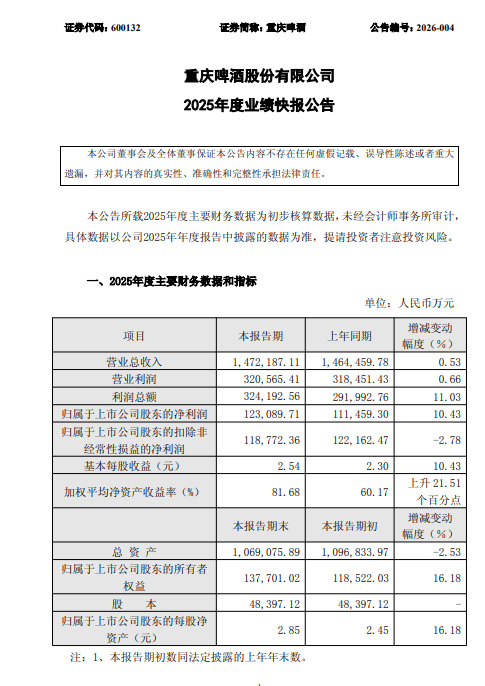 重庆啤酒业绩快报:2025年净利润12.31亿元,同比增长10.43%2026-02-04 阅读(1)
 -
 大瓜!股民集体举报国投瑞银基金2026-02-04 阅读(1)
-
 如何删除自带的不常用应用为windows 7减负2001-12-01 阅读(45)
 -
 各个都很实用:windows 7系统电脑日常小技巧2002-01-01 阅读(45)
 -
 Windows7截图出现黑屏导致截的图黑呼呼一片2002-01-01 阅读(42)
 -
 windows 7如何创建拨号连接2002-01-01 阅读(41)
 -
 windows 7怎么设置密码永不过期?2002-02-01 阅读(43)
 -
 windows 7 xp宋体 成功替换windows 7宋体为XP宋体的方法2002-02-01 阅读(45)
 -
 windows 7玩战争策略游戏星际争霸花屏问题解决方法2002-02-01 阅读(38)
 -
 windows 7启动后检测到硬盘出错提示请立即备份文件2002-02-01 阅读(31)
-
 Windows7安装Solr+Tomcat的方法2010-05-01 阅读(215)
 -
 windows 7下先装SQL2005后装SQL2000 正确连接方法2010-10-01 阅读(143)
 -
 站长需要掌握的知识与技能2025-10-13 阅读(114)
 -
 马斯克:特斯拉2024年AI投资百亿,FSD 安全水平将超过人类2025-03-21 阅读(104)
 -
H5项目调用微信授权并实现登录功能2025-10-13 阅读(97)
-
 OpenStack 入门教程2015-05-14 阅读(94)
 -
 华为称已准备好取代谷歌应用:有10亿美元全球基金2019-12-25 阅读(93)
 -
 西部数据WD 25年第三季度财报:营收为 22.9 亿美元,环比下降 5%2025-05-02 阅读(90)
- 随机文章


- 热评文章
- 最近评论
-
