

MySQL索引和查询优化的实际操作(1)
以下的文章主要介绍的是MySQL索引和查询优化的实际操作流程,我们大家都知道MySQL索引和查询优化在实际操作中出现的比例较高,所以对其有更深的了解会在你今后的学习中有所收获所。
恰当的索引可以加快查询速度,可以分为四种类型:主键、唯一索引、全文索引、普通索引。
主键:唯一且没有null值。
create table pk_test(f1 int not null,primary key(f1)); alter table customer modify id int not null, add primary key(id);
普通索引:允许重复的值出现。
create table tableanme (fieldname1 columntype,fieldname2 columntype,index [indexname] (fieldname1 [,fieldname2...])); create table tablename add index [indexname] (fieldname1 [fieldname2...]); alter table slaes add index(value);
全文MySQL索引:用来对大表的文本域(char,varchar,text)进行索引。
语法和普通索引一样-fulltext。
使用全文索引:create table ft2 (f1 varchar(255),fulltext(f1));
insert into ft2 values('wating for the bvarbariands'),('in the heart of the country'),('the master of peter *** urg'),('writing and being'),('heart of the beast'),('master master');
select * from ft2 where match(f1) against('master'); // match()-匹配域;against()匹配值。
MySQL会对某些字忽略,造成查询的误差:a. 50%以上的域出现的单词;b.少于三个字的单词;c.MySQL预定义的列表,包括the。查询语句:select * from ft2 where match(f1) against('the master'); // 与希望的结果是不同的
相关性分数查询:select f1,(match(f1) against('master')) from ft2;
MySQL4的新功能-布尔全文查询:select * from ft2 where match(f1) against('+master -pet' in boolean mode); // 运算符类型 +-<>()~*"
唯一索引:除了不能有重复的记录外,其它和普通索引一样。
create table ui_test (f1 int,f2 int,unique(f1));
alter table ui_test add unique(f2);
对域(varchar,char,blob,text)的部分创建MySQL索引:alter table customer add index (surname(10));
自动增加域:每次插入记录时会自动增加一个域的值,只能用于一个域,且这个域有索引。
create table tablename(fieldname int auto_increment,[fieldname2...,] primary key(filedname));
alter table tablename modify fieldname columntype auto_increment;
last_insert_id()函数返回最新插入的自动增加值。
select last_insert_id() from customer limit 1;
此函数在多个连接同时进行时,会发生错误。
重置自动增加计数器的值:
create table tablename(fieldname int auto_increment,[fieldname2...,] primary key(filedname) auto_increment=50);
alter table tablename auto_increment=50;
如果重置的值比存在的值小,自动增加计数器会从记录中更大的那个值开始增加计数,比如customer表中的id已经有1、2、3、15、16、20,当把自动增加计数器的值设为1时,下次插入的记录会从21开始。
自动增加计数器的越界:有效值为1~2的127次方,即2147483647。如果超过这个值(包括负值),MySQL会自动把它设为更大值,这样就会产生一个重复键值的错误。
自动增加域在多列MySQL索引中的使用:
create table staff(rank enum('employee','manager','contractor') not null,position varchar(100),id int not null auto_increment,primary key(rank,id));
insert into staff(rank,position) values('employee','cleaner'),('cotractor','network maintenance'),('manager','sales manager');
在对每个级别添加一些数据,会看到熟悉的自动增加现象:
insert into staff(rank,position) values('employee','cleaner1'),('employee','network maintenance1'),('manager','sales manager1');
在这种情况下是不能重置自动增加计数器的。
删除或更改索引:对索引的更改都需要先删除再重新定义。
alter table tablename drop primary key;
alter table table drop index indexname;
drop index on tablename;
高效使用索引:下面讨论的是用了索引会给我们带来什么?
1.) 获得域where从句中匹配的行:select * from customer where surname>'c';
2.) 查找max()和min()值时,MySQL只需在排序的索引中查找之一个和最后一个值。
3.) 返回的部分是MySQL索引的一部分,MySQL就不需要去查询全表的数据而只需看索引:select id from custo及mer;
4.) 对域使用order by的地方:select * from customer order by surname;
5.) 还可以加速表的连接:select first_name,surname,commission from sales,sales_rep where sales.sales_rep=sales_rep.employee_number and code=8;
6.) 在通配符的情况下:select * from sales_rep where surname like 'ser%';
这种情况就不能起作用:select * from sales_rep where surname like '%ser%';
选择索引:
1.) 有查询需要使用索引(比如where从句中条件的域)的时候,要创建索引;不要不使用的域(不如之一个字符是通配符的)创建索引。
2.) 创建的索引返回的行越少越好,主键更好,枚举类型的索引不什么用处。
3.) 使用短索引(比如,名字的头十个字符而不是全部)。
4.) 不要创建太多的MySQL索引,虽然加快了查询的速度,但增加了更新的添加记录的时间。如果索引在查询中很少使用,而没有索引只是轻微的影响速度,就不要创建索引。
最左边规则:这种情况发生在多个有索引的域上,MySQL从索引列表的最左边开始,按顺序使用他们。
alter table customer add initial varchar(5); alter table customer add index(surname,initial,first_name); update customer set initial='x' where id=1; update customer set initial='c' where id=2; update customer set initial='v' where id=3; update customer set initial='b' where id=4; update customer set initial='n' where id=20; update customer set initial='m' where id=21;
如果在查询中使用了这三个域,那就更大限度的利用了索引:select * from customer where surname='clegg' and initial='x' and first_name='yvonne';
或者是利用MySQL索引的大部分:select * from customer where surname='clegg' and initial='x';
或仅仅是surname:select * from customer where surname='clegg';
如果打破最左边规则,下面的例子就不会用到索引:select * from customer where initial='x' and first_name='yvonne';
select * from customer where initial='x' ;
select * from customer where first_name='yvonne';
select * from customer where surname='clegg' and first_name='yvonne';
使用explain-解释MySQL如何使用索引来处理select语句及连接表的。
输入 explain select * from customer; 后,出现一张表,个行的意思如下:
table-显示此行数据属于哪张表;type-重要的一列,显示使用了何种连接,从好到差依次为const、eq_ref、ref、range、index、all,下面会详细说明;possible_keys-可以应用在这张表中的索引,如果为null,则表示没有可用索引;key-实际使用的索引,如为null,表示没有用到索引;key_len-索引的长度,在不损失精确度的情况下,越短越好;ref-显示索引的哪一列被使用了,如果可能的话,是个常数;rows-返回请求数据的行数;extra-关于MySQL如何解析查询的额外信息,下面会详细说明。
extra行的描述:distinct-MySQL找到了域行联合匹配的行,就不再搜索了;
not exists-MySQL优化了left join,一旦找到了匹配left join的行,就不再搜索了;
range checked for each-没找到理想的索引,一次对于从前面表中来的每一个行组合;
record(index map: #)-检查使用哪个MySQL索引,并用它从表中返回行,这是使用索引最慢的一种;
using filesort-看到这个就需要优化查询了,MySQL需要额外的步骤来发现如何对返回的行排序。他根据连接类型以及存储排序键值和匹配条件的全部行的行指针来排序全部行。
using index-列数据是从单单使用了索引中的信息而没有读取实际行的表返回的,这发生在对表的全部的请求列都是同一个索引时;
using temporary-看到这个就需要优化查询了,MySQL需要创建一个临时表来查询存储结果,这通常发生在多不同的列表进行order by时,而不是group by;
where used-使用了where从句来限制哪些行将与下一张表匹配或是返回给用户。如不想返回表中用的全部行,并连接类型是all或index,这就会发生,也可能是查询有问题。
type的描述:system-表只有一行,这是const连接类型的特例;const-表中一个记录的更大值能够匹配这个查询(索引可以是主键或唯一索引)。因为只有一行,这个值实际就是常数,因为MySQL先读这个值,再把它当作常数对待;eq_ref-从前面的表中,对每一个记录的联合都从表中读取一个记录。在查询使用索引为主键或唯一索引的全部时使用;ref-只有使用了不是主键或唯一索引的部分时发生。
对于前面表的每一行联合,全部记录都将从表中读出,这个连接类型严重依赖索引匹配记录的多少-越少越好;range-使用索引返回一个范围中的行,比如使用>或<查找时发生;index-这个连接类型对前面的表中的每一个记录联合进行完全扫描(比all好,因为索引一般小于表数据);all-这个连接类型多前面的表中的每一个记录联合进行完全扫描,这个比较糟糕,应该尽量避免。
举个例子:create index sales_rep on sales(sales_rep); // 可以比较一下创建MySQL索引前后的变化
explain select * from sales_rep left join sales on sales.sales_rep = sales_rep.employee_number;
结果如下:
table type possible_keys key key_len ref rows extra sales_rep all null null null null 5 sales ref sales_rep sales_rep 5 sales_rep.employee_number 2
这个结果表示sales_rep表有个不好的连接类型-all,没用到索引,要查询的行数为5;sales的连接类型为ref,可用的索引是sales_rep,实际也使用sales_rep索引,这个索引的长度是5,对应的列是employee_number,要查询的行数为2,所以这次查询对表共进行了5×2次查询。
查看索引信息:show index from tablename;
列的描述:table-正在查看的表名;non_unique-1或1.0表示索引不能包含重复值(主键和唯一索引),1表示可以;key_name-索引名;seq_in_index-索引中列的顺序,从1开始;column_name-列名;collation-a或null,a表示索引以序升排列,null表示不排序;
cardinality-索引中唯一值的个数;sub_part-如果整个列为MySQL索引,值为null,否则以字符表示索引的大小;packed-是否打包;null-如果列能包含null,则为yes;comment-各种注释。
以下的文章主要介绍的是MySQL索引和查询优化的实际操作流程,我们大家都知道MySQL索引和查询优化在实际操作中出现的比例较高,所以对其有更深的了解会在你今后的学习中有所收获所。
恰当的索引可以加快查询速度,可以分为四种类型:主键、唯一索引、全文索引、普通索引。
主键:唯一且没有null值。
create table pk_test(f1 int not null,primary key(f1)); alter table customer modify id int not null, add primary key(id);
普通索引:允许重复的值出现。
create table tableanme (fieldname1 columntype,fieldname2 columntype,index [indexname] (fieldname1 [,fieldname2...])); create table tablename add index [indexname] (fieldname1 [fieldname2...]); alter table slaes add index(value);
全文MySQL索引:用来对大表的文本域(char,varchar,text)进行索引。
语法和普通索引一样-fulltext。
使用全文索引:create table ft2 (f1 varchar(255),fulltext(f1));
insert into ft2 values('wating for the bvarbariands'),('in the heart of the country'),('the master of peter *** urg'),('writing and being'),('heart of the beast'),('master master');
select * from ft2 where match(f1) against('master'); // match()-匹配域;against()匹配值。
MySQL会对某些字忽略,造成查询的误差:a. 50%以上的域出现的单词;b.少于三个字的单词;c.MySQL预定义的列表,包括the。查询语句:select * from ft2 where match(f1) against('the master'); // 与希望的结果是不同的
相关性分数查询:select f1,(match(f1) against('master')) from ft2;
MySQL4的新功能-布尔全文查询:select * from ft2 where match(f1) against('+master -pet' in boolean mode); // 运算符类型 +-<>()~*"
唯一索引:除了不能有重复的记录外,其它和普通索引一样。
create table ui_test (f1 int,f2 int,unique(f1));
alter table ui_test add unique(f2);
对域(varchar,char,blob,text)的部分创建MySQL索引:alter table customer add index (surname(10));
自动增加域:每次插入记录时会自动增加一个域的值,只能用于一个域,且这个域有索引。
create table tablename(fieldname int auto_increment,[fieldname2...,] primary key(filedname));
alter table tablename modify fieldname columntype auto_increment;
last_insert_id()函数返回最新插入的自动增加值。
select last_insert_id() from customer limit 1;
此函数在多个连接同时进行时,会发生错误。
重置自动增加计数器的值:
create table tablename(fieldname int auto_increment,[fieldname2...,] primary key(filedname) auto_increment=50);
alter table tablename auto_increment=50;
如果重置的值比存在的值小,自动增加计数器会从记录中更大的那个值开始增加计数,比如customer表中的id已经有1、2、3、15、16、20,当把自动增加计数器的值设为1时,下次插入的记录会从21开始。
自动增加计数器的越界:有效值为1~2的127次方,即2147483647。如果超过这个值(包括负值),MySQL会自动把它设为更大值,这样就会产生一个重复键值的错误。
自动增加域在多列MySQL索引中的使用:
create table staff(rank enum('employee','manager','contractor') not null,position varchar(100),id int not null auto_increment,primary key(rank,id));
insert into staff(rank,position) values('employee','cleaner'),('cotractor','network maintenance'),('manager','sales manager');
在对每个级别添加一些数据,会看到熟悉的自动增加现象:
insert into staff(rank,position) values('employee','cleaner1'),('employee','network maintenance1'),('manager','sales manager1');
在这种情况下是不能重置自动增加计数器的。
删除或更改索引:对索引的更改都需要先删除再重新定义。
alter table tablename drop primary key;
alter table table drop index indexname;
drop index on tablename;
高效使用索引:下面讨论的是用了索引会给我们带来什么?
1.) 获得域where从句中匹配的行:select * from customer where surname>'c';
2.) 查找max()和min()值时,MySQL只需在排序的索引中查找之一个和最后一个值。
3.) 返回的部分是MySQL索引的一部分,MySQL就不需要去查询全表的数据而只需看索引:select id from custo及mer;
4.) 对域使用order by的地方:select * from customer order by surname;
5.) 还可以加速表的连接:select first_name,surname,commission from sales,sales_rep where sales.sales_rep=sales_rep.employee_number and code=8;
6.) 在通配符的情况下:select * from sales_rep where surname like 'ser%';
这种情况就不能起作用:select * from sales_rep where surname like '%ser%';
选择索引:
1.) 有查询需要使用索引(比如where从句中条件的域)的时候,要创建索引;不要不使用的域(不如之一个字符是通配符的)创建索引。
2.) 创建的索引返回的行越少越好,主键更好,枚举类型的索引不什么用处。
3.) 使用短索引(比如,名字的头十个字符而不是全部)。
4.) 不要创建太多的MySQL索引,虽然加快了查询的速度,但增加了更新的添加记录的时间。如果索引在查询中很少使用,而没有索引只是轻微的影响速度,就不要创建索引。
最左边规则:这种情况发生在多个有索引的域上,MySQL从索引列表的最左边开始,按顺序使用他们。
alter table customer add initial varchar(5); alter table customer add index(surname,initial,first_name); update customer set initial='x' where id=1; update customer set initial='c' where id=2; update customer set initial='v' where id=3; update customer set initial='b' where id=4; update customer set initial='n' where id=20; update customer set initial='m' where id=21;
如果在查询中使用了这三个域,那就更大限度的利用了索引:select * from customer where surname='clegg' and initial='x' and first_name='yvonne';
或者是利用MySQL索引的大部分:select * from customer where surname='clegg' and initial='x';
或仅仅是surname:select * from customer where surname='clegg';
如果打破最左边规则,下面的例子就不会用到索引:select * from customer where initial='x' and first_name='yvonne';
select * from customer where initial='x' ;
select * from customer where first_name='yvonne';
select * from customer where surname='clegg' and first_name='yvonne';
使用explain-解释MySQL如何使用索引来处理select语句及连接表的。
输入 explain select * from customer; 后,出现一张表,个行的意思如下:
table-显示此行数据属于哪张表;type-重要的一列,显示使用了何种连接,从好到差依次为const、eq_ref、ref、range、index、all,下面会详细说明;possible_keys-可以应用在这张表中的索引,如果为null,则表示没有可用索引;key-实际使用的索引,如为null,表示没有用到索引;key_len-索引的长度,在不损失精确度的情况下,越短越好;ref-显示索引的哪一列被使用了,如果可能的话,是个常数;rows-返回请求数据的行数;extra-关于MySQL如何解析查询的额外信息,下面会详细说明。
extra行的描述:distinct-MySQL找到了域行联合匹配的行,就不再搜索了;
not exists-MySQL优化了left join,一旦找到了匹配left join的行,就不再搜索了;
range checked for each-没找到理想的索引,一次对于从前面表中来的每一个行组合;
record(index map: #)-检查使用哪个MySQL索引,并用它从表中返回行,这是使用索引最慢的一种;
using filesort-看到这个就需要优化查询了,MySQL需要额外的步骤来发现如何对返回的行排序。他根据连接类型以及存储排序键值和匹配条件的全部行的行指针来排序全部行。
using index-列数据是从单单使用了索引中的信息而没有读取实际行的表返回的,这发生在对表的全部的请求列都是同一个索引时;
using temporary-看到这个就需要优化查询了,MySQL需要创建一个临时表来查询存储结果,这通常发生在多不同的列表进行order by时,而不是group by;
where used-使用了where从句来限制哪些行将与下一张表匹配或是返回给用户。如不想返回表中用的全部行,并连接类型是all或index,这就会发生,也可能是查询有问题。
type的描述:system-表只有一行,这是const连接类型的特例;const-表中一个记录的更大值能够匹配这个查询(索引可以是主键或唯一索引)。因为只有一行,这个值实际就是常数,因为MySQL先读这个值,再把它当作常数对待;eq_ref-从前面的表中,对每一个记录的联合都从表中读取一个记录。在查询使用索引为主键或唯一索引的全部时使用;ref-只有使用了不是主键或唯一索引的部分时发生。
对于前面表的每一行联合,全部记录都将从表中读出,这个连接类型严重依赖索引匹配记录的多少-越少越好;range-使用索引返回一个范围中的行,比如使用>或<查找时发生;index-这个连接类型对前面的表中的每一个记录联合进行完全扫描(比all好,因为索引一般小于表数据);all-这个连接类型多前面的表中的每一个记录联合进行完全扫描,这个比较糟糕,应该尽量避免。
举个例子:create index sales_rep on sales(sales_rep); // 可以比较一下创建MySQL索引前后的变化
explain select * from sales_rep left join sales on sales.sales_rep = sales_rep.employee_number;
结果如下:
table type possible_keys key key_len ref rows extra sales_rep all null null null null 5 sales ref sales_rep sales_rep 5 sales_rep.employee_number 2
这个结果表示sales_rep表有个不好的连接类型-all,没用到索引,要查询的行数为5;sales的连接类型为ref,可用的索引是sales_rep,实际也使用sales_rep索引,这个索引的长度是5,对应的列是employee_number,要查询的行数为2,所以这次查询对表共进行了5×2次查询。
查看索引信息:show index from tablename;
列的描述:table-正在查看的表名;non_unique-1或1.0表示索引不能包含重复值(主键和唯一索引),1表示可以;key_name-索引名;seq_in_index-索引中列的顺序,从1开始;column_name-列名;collation-a或null,a表示索引以序升排列,null表示不排序;
cardinality-索引中唯一值的个数;sub_part-如果整个列为MySQL索引,值为null,否则以字符表示索引的大小;packed-是否打包;null-如果列能包含null,则为yes;comment-各种注释。
“MySQL索引和查询优化的实际操作(1)” 的相关文章
windows 7系统的电脑发出嘟嘟嘟的声音该怎么解决?
在某些电脑中,机器内部蜂鸣器与系统的声音输出方案是相关联的,这样一来会导致当系统输出声音时,即使电脑没有连接外部音响或耳机,也会通过内置蜂鸣器发出“嘟嘟哔哔”的声音。这个问题主要出现在Windows 7电脑中,假如你的电脑恰好遇到了这样的问题,可参考下面的方法来解决: 1、在桌面“计算机”图标上右...
如何删除自带的不常用应用为windows 7减负
对于Windows 7系统来说,其默认安装的许多工具是我们很少使用或从来不用的,比如系统自带的扫雷、纸牌游戏等。删除此类长期不用的系统组件,不但可以让系统更清爽,更重要的是还可以提高系统的运行速度,特别是对于硬件配置相对较低的上网本来说,尤其如此。接下来,笔者就给大家介绍一下如何删除Windows...
上帝不止一个 更多Windows7 快捷模式.
国外媒体CNET NEWS就这个“上帝模式”和微软Windows部门主管Steven Sinofsky进行邮件交流后得知,这其实只是众多快捷方式中的一个,Sinofsky在邮件里给出了十多个这类快捷方式的关键字符串。 它们的建立方法和之前的“上帝模式”一样,在任意位置新建的一个文件夹,然后改名即可...
windows 7系统件夹和文件都不显示名字如何解决
假如碰到电脑里的文件夹和文件全都不显示名字了(如下图),是不是电脑中毒了呢 请教下笔者有没好的解决方法!下面是笔者给出的答案,希望能够帮助到大家! 首先打开你用来装图片的文件夹(缩略图下面的文字不显示的文件夹),然后但击工具栏上的“查看”选择“平铺”, 下面就是关键:要按住SHIFT键不...

windows 7系统重装后卡在正在启动Windows开机界面怎么办
重装系统是我们面对许多电脑问题时的终极方法,不过重装系统也不意味着就能将全部的问题都修复。一些用户在重装系统后开机时,电脑卡在“正在启动Windows”开机界面上了,这要怎么解决呢? Windows 7系统重装后卡在开机界面的解决方法: 一、首先可以看看该故障出现的原因是否是因为启动了acp...

Windows7播放电影视频蓝屏无论什么格式都会蓝屏
问:我在Windows 7 Ultimate X64下播放电影视频时,不管什么格式都会蓝屏,错误代码“0x00000124”。换解码器、播放器不行,换驱动、内存也不管用。在不同的电脑上也试过,仍然蓝屏。请问是哪里的问题,如何解决 答:64位 Windows 7直接使用PotPlayer x64就...
- 最新文章
- 热门阅读
-
- 站长需要掌握的知识与技能
114 浏览站长资讯
- 马斯克:特斯拉2024年AI投资百亿,FSD 安全水平将超过人类
104 浏览站长资讯
- H5项目调用微信授权并实现登录功能
97 浏览未命名
- 新站怎样做好网络营销步实用方案解决推广难题实现长期排名
90 浏览SEO推广
- 西部数据WD 25年第三季度财报:营收为 22.9 亿美元,环比下降 5%
90 浏览站长资讯
- 站长需要掌握的知识与技能
-
最新文章
随机文章
热门文章
-
 亚马逊AI助手Alexa+现已面向全美用户开放2026-02-05 阅读(0)
 -
 亚马逊或将为Alexa采用定制版OpenAI模型2026-02-04 阅读(1)
 -
 艾伯维预测2026年利润超预期,新型免疫药物销售强劲2026-02-04 阅读(0)
 -
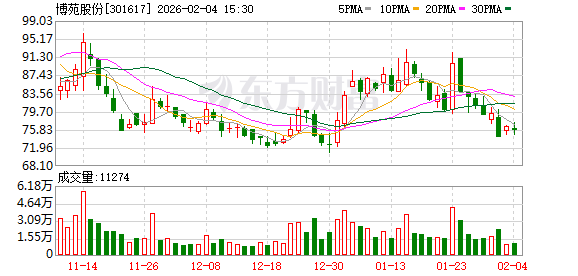 博苑股份:截至2026年1月30日股东总户数为9117户2026-02-04 阅读(1)
 -
 新华社权威速览丨中央一号文件划重点,2026年“三农”工作这么干2026-02-04 阅读(1)
 -
 桑坦德银行跌近4% 拟122亿美元收购美国韦伯斯特银行2026-02-04 阅读(1)
 -
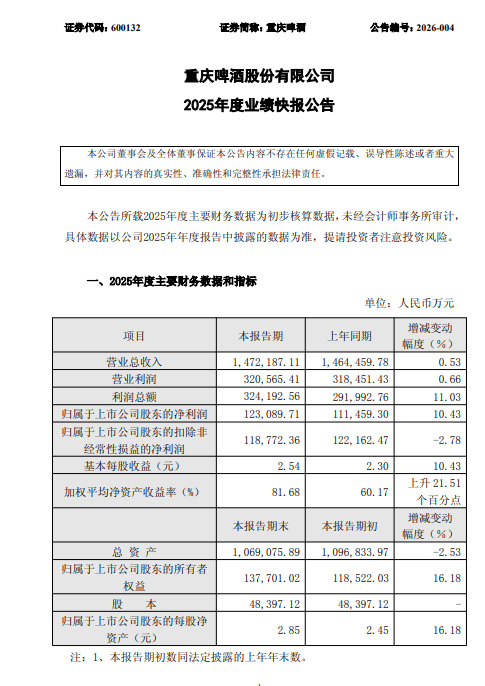 重庆啤酒业绩快报:2025年净利润12.31亿元,同比增长10.43%2026-02-04 阅读(1)
 -
 大瓜!股民集体举报国投瑞银基金2026-02-04 阅读(1)
-
 windows 7系统的电脑发出嘟嘟嘟的声音该怎么解决?2001-12-01 阅读(50)
 -
 如何删除自带的不常用应用为windows 7减负2001-12-01 阅读(45)
 -
 解决windows 7无法将程序锁定到任务栏或附到开始菜单的方法2002-01-01 阅读(45)
 -
 ubuntu14.04打开个几个应用窗口最小化后怎么切换呢?2002-01-01 阅读(38)
 -
 windows 7 xp宋体 成功替换windows 7宋体为XP宋体的方法2002-02-01 阅读(45)
 -
 3个实用的windows 7 DOS操作系统技巧2002-02-01 阅读(39)
 -
 windows 7启动后检测到硬盘出错提示请立即备份文件2002-02-01 阅读(31)
 -
 windows 7通过禁用nvcpl服务项减少开机时间提高开机速度2002-02-01 阅读(36)
-
 Windows7安装Solr+Tomcat的方法2010-05-01 阅读(215)
 -
 windows 7下先装SQL2005后装SQL2000 正确连接方法2010-10-01 阅读(143)
 -
 站长需要掌握的知识与技能2025-10-13 阅读(114)
 -
 马斯克:特斯拉2024年AI投资百亿,FSD 安全水平将超过人类2025-03-21 阅读(104)
 -
H5项目调用微信授权并实现登录功能2025-10-13 阅读(97)
-
 OpenStack 入门教程2015-05-14 阅读(94)
 -
 华为称已准备好取代谷歌应用:有10亿美元全球基金2019-12-25 阅读(93)
 -
 西部数据WD 25年第三季度财报:营收为 22.9 亿美元,环比下降 5%2025-05-02 阅读(90)
- 随机文章


- 热评文章
- 最近评论
-
