

SQL Server学习笔记之一对多的删除问题(1)
以下的文章主要描述的是SQL Server学习笔记之一对多的删除问题,假如你对其实际相关操作有兴趣了解的话,下面的文章你一定不要错过,望你在浏览完此篇文章之后会对你在今后的学习中有更好的了解。
Hibernate能支持MS SQL7.0吗?
Hibernate深度探险!!----原创!
推荐圈子: Database圈子
更多相关推荐
1、create database school 创建数据库school
2、drop database school 删除数据库school
3、use school 连接到school数据库,使其成为当前数据库
4、create table class(classID int primary key identity not null)
创建一个名为class的表,其有一个int型数据classID字段,该字段设置了主键约束
SQL Server学习笔记之并自动编号列且不能为空
5、select * from class 查询class表中的所有字段
6、drop table class 删除class表
7、select * into class2 from class
将class表中的所有数据复制到class2表中
8、select * into class2 from class where 1=0 只复制表结构
9、insert into class2(className) values('Juhn')或
insert into class2(className,tel) values('Bile','0731-2255664')
在class2表中插入一条记录
10、delete from class2 where classID=2
删除class2表中classID为2的行,假如指定where条件将删除所有的行
delete from student where StudentID between 13 and 15
删除Student表中StudentID在13至15之间的数据(包括13和15)
11、alter table class2 add tel varchar(15) default('没有 *** ')
修改表class2,为它添加一个tel列并将其默认值设为'没有 *** '
12、alter table class2 drop column tel 删除列
13、alter table student add constraint telDefault default('没有 *** ') for tel
SQL Server学习笔记之修改tel列的默认值
14、create table class3(classID int ,constraint id_key primary key(classID))
创建一个名为class3的表并为它设置了名为id_key的主键约束
15、unique 唯一约束
16、alter table class2 add age int check (age between 0 and 120)
为class2添一个age列,并为其设置检查约束,使其的取值在0到120之间
17、alter table class2 add age int ,constraint ageCheck check
(age between 0 and 120)
其设置检查约束 *** 二,为约束取名为ageCheck
18、alter table class2 add tel varchar(15) ,check
(tel like '[0-9][0-9][0-9]-[0-9][0-9][0-9][0-9][0-9][0-9][0-9]')
其设置检查约束 *** 三,此为模糊约束
19、create table class3(ID int primary key identity,classID int ,
name varchar(15) ,constraint classID foreign key(classID) references
class2(classID))
SQL Server学习笔记之设置外键约束
20、alter table class3 drop classID
删除class3的classID外键约束
21、create index class2Name on class2(className)
在class2表的calssName字段上创建一个class2Name的索引
22、create unique index class2Name on class2(className)
SQL Server学习笔记之创建唯一索引
23、select classID,className from class2 where className='body'
select classID,className from class2 where className like '%s'
创建索引后查询的的速度将更快,但会降低insert、update、delete的执行速度
24、drop index class2.class2Name 删除表class2上的class2Name索引
25、update class2 set className='Lida',tel='13787277732' where classID=3
将class2表中className和tel列、classID=3
行的单元格的值改为'Lida'和'13787277732',注意忽略where语句将改变表中所有的行
26、create default sexDefault as '男'; 创建一个名为sexDefault的默认值
sp_bindefault sexDefault,'student.sex';
将创建的sexDefault默认值绑定到student表的sex字段上
27、insert into class2(name,names) select name,names from class1
将class1中的数据全部复制到class2中
28、truncate table class 删除class表中所有的行
29、select Name 国家,Population 人口 from BBC where Name
in('France','Cermany','Italy United')
查询BBC表中'France','Cermany','Italy United'三个地区的所在的国家和人口数
30、select Name 国家 from BBC where Name like '%United%'
查询BBC表中的Name字段中包含United字符的国家,通配符"_"表示匹配任意单个字符
30、select Name 国家, Population 人口 from BBC where Population>100000000 order by Population desc
查询BBC表中的Population字段大于100000000的国家和人口,并按降序排序,默认为升序asc
31、select Name,round(Population/1000000,0) as '人口(百万)' from BBC where Region='South Asia'
查询BBC表中的Region='South Asia'国家和百万人口数(round是四舍五入)
32、select distinct Region from BBC
查询BBC表中的Region字段中的非重复数据,distinct排除重复数据
如有多列则作用在列的组合上,而不再作用在单列上
33、select top 50 percent * from BBC
查询BBC表中的所有字段,但只返回总行数的50%,percent表百分数、可选
34、select * from BBC where Area>100 and not GDP<10000000
查询BBC表中的所有Area小于100并且GDP不小于10000000的数据,会返回所有的列,不只是Area列
33、select * from BBC where Area not between 20000 and 30000
查询BBC表中的所有Area不在20000和30000之间的数据,会返回所有的列,不只是Area列
34、select distinct Name+str(Age) 学生 from Student
查询Student表中Name和Age字段都不重复的数据
str(Age)返回Age的字符串表达形式,"学生"是别名
35、select * from Student where Nealth is null
查询Student表中Nealth字段为null的数据
36、exec sp_helpconstraint 'Teacher'
SQL Server学习笔记之查看'Teacher'表中的所有约束
37、select * from Student where StudentID=1
for xml raw
返回XML语句
38、drop procedure MyProcedure
删除一个存在的存储过程
39、create procedure insert_Procedure
@Name varchar(10),
@Sex varchar(2),
@Age int,
@Tel varchar(20),
@Address varchar(50)
as
insert into student(Name,Sex,Age,Tel,Address) values(@Name,@Sex,@Age,@Tel,@Address)
创建一个插入数据的存储过程
40、select datediff(day,'20090403',getdate())
用指定时间减去当前时间,返回的是天数,还可以用month返回月数
以上的相关内容就是对SQL Server学习笔记之一对多的删除问题的介绍,望你能有所收获。
以下的文章主要描述的是SQL Server学习笔记之一对多的删除问题,假如你对其实际相关操作有兴趣了解的话,下面的文章你一定不要错过,望你在浏览完此篇文章之后会对你在今后的学习中有更好的了解。
Hibernate能支持MS SQL7.0吗?
Hibernate深度探险!!----原创!
推荐圈子: Database圈子
更多相关推荐
1、create database school 创建数据库school
2、drop database school 删除数据库school
3、use school 连接到school数据库,使其成为当前数据库
4、create table class(classID int primary key identity not null)
创建一个名为class的表,其有一个int型数据classID字段,该字段设置了主键约束
SQL Server学习笔记之并自动编号列且不能为空
5、select * from class 查询class表中的所有字段
6、drop table class 删除class表
7、select * into class2 from class
将class表中的所有数据复制到class2表中
8、select * into class2 from class where 1=0 只复制表结构
9、insert into class2(className) values('Juhn')或
insert into class2(className,tel) values('Bile','0731-2255664')
在class2表中插入一条记录
10、delete from class2 where classID=2
删除class2表中classID为2的行,假如指定where条件将删除所有的行
delete from Student where StudentID between 13 and 15
删除Student表中StudentID在13至15之间的数据(包括13和15)
11、alter table class2 add tel varchar(15) default('没有 *** ')
修改表class2,为它添加一个tel列并将其默认值设为'没有 *** '
12、alter table class2 drop column tel 删除列
13、alter table student add constraint telDefault default('没有 *** ') for tel
SQL Server学习笔记之修改tel列的默认值
14、create table class3(classID int ,constraint id_key primary key(classID))
创建一个名为class3的表并为它设置了名为id_key的主键约束
15、unique 唯一约束
16、alter table class2 add age int check (age between 0 and 120)
为class2添一个age列,并为其设置检查约束,使其的取值在0到120之间
17、alter table class2 add age int ,constraint ageCheck check
(age between 0 and 120)
其设置检查约束 *** 二,为约束取名为ageCheck
18、alter table class2 add tel varchar(15) ,check
(tel like '[0-9][0-9][0-9]-[0-9][0-9][0-9][0-9][0-9][0-9][0-9]')
其设置检查约束 *** 三,此为模糊约束
19、create table class3(ID int primary key identity,classID int ,
name varchar(15) ,constraint classID foreign key(classID) references
class2(classID))
SQL Server学习笔记之设置外键约束
20、alter table class3 drop classID
删除class3的classID外键约束
21、create index class2Name on class2(className)
在class2表的calssName字段上创建一个class2Name的索引
22、create unique index class2Name on class2(className)
SQL Server学习笔记之创建唯一索引
23、select classID,className from class2 where className='body'
select classID,className from class2 where className like '%s'
创建索引后查询的的速度将更快,但会降低insert、update、delete的执行速度
24、drop index class2.class2Name 删除表class2上的class2Name索引
25、update class2 set className='Lida',tel='13787277732' where classID=3
将class2表中className和tel列、classID=3
行的单元格的值改为'Lida'和'13787277732',注意忽略where语句将改变表中所有的行
26、create default sexDefault as '男'; 创建一个名为sexDefault的默认值
sp_bindefault sexDefault,'student.sex';
将创建的sexDefault默认值绑定到student表的sex字段上
27、insert into class2(name,names) select name,names from class1
将class1中的数据全部复制到class2中
28、truncate table class 删除class表中所有的行
29、select Name 国家,Population 人口 from BBC where Name
in('France','Cermany','Italy United')
查询BBC表中'France','Cermany','Italy United'三个地区的所在的国家和人口数
30、select Name 国家 from BBC where Name like '%United%'
查询BBC表中的Name字段中包含United字符的国家,通配符"_"表示匹配任意单个字符
30、select Name 国家, Population 人口 from BBC where Population>100000000 order by Population desc
查询BBC表中的Population字段大于100000000的国家和人口,并按降序排序,默认为升序asc
31、select Name,round(Population/1000000,0) as '人口(百万)' from BBC where Region='South Asia'
查询BBC表中的Region='South Asia'国家和百万人口数(round是四舍五入)
32、select distinct Region from BBC
查询BBC表中的Region字段中的非重复数据,distinct排除重复数据
如有多列则作用在列的组合上,而不再作用在单列上
33、select top 50 percent * from BBC
查询BBC表中的所有字段,但只返回总行数的50%,percent表百分数、可选
34、select * from BBC where Area>100 and not GDP<10000000
查询BBC表中的所有Area小于100并且GDP不小于10000000的数据,会返回所有的列,不只是Area列
33、select * from BBC where Area not between 20000 and 30000
查询BBC表中的所有Area不在20000和30000之间的数据,会返回所有的列,不只是Area列
34、select distinct Name+str(Age) 学生 from Student
查询Student表中Name和Age字段都不重复的数据
str(Age)返回Age的字符串表达形式,"学生"是别名
35、select * from Student where Nealth is null
查询Student表中Nealth字段为null的数据
36、exec sp_helpconstraint 'Teacher'
SQL Server学习笔记之查看'Teacher'表中的所有约束
37、select * from Student where StudentID=1
for xml raw
返回XML语句
38、drop procedure MyProcedure
删除一个存在的存储过程
39、create procedure insert_Procedure
@Name varchar(10),
@Sex varchar(2),
@Age int,
@Tel varchar(20),
@Address varchar(50)
as
insert into student(Name,Sex,Age,Tel,Address) values(@Name,@Sex,@Age,@Tel,@Address)
创建一个插入数据的存储过程
40、select datediff(day,'20090403',getdate())
用指定时间减去当前时间,返回的是天数,还可以用month返回月数
以上的相关内容就是对SQL Server学习笔记之一对多的删除问题的介绍,望你能有所收获。
“SQL Server学习笔记之一对多的删除问题(1)” 的相关文章

windows 7查看电脑近期使用情况确定有没有被他人使用
我一个朋友最近装装了Windows 7,他总感觉有人用了他的电脑,但是一直不确定,他想知道有没有人动用他的电脑,问我有没有办法 我说设置一下就行了: 启动Windows 7,在搜索栏中输入编辑组,马上就搜索到了编辑组策略,点击即可启动程序编辑组策略。依次展开组策略左侧树形列表的计算机配置/管理模...
Win 7系统中其他声音正常但酷狗音乐没声音怎么回事
故障现象: Windows 7酷狗软件无声音,系统声音正常。 原因分析: 1. 查看酷狗软件设置 2. 查看系统设置 解决方案: 1. Windows 7操作方法 如图:查看是否处于禁音状态 Windows 7系统声音正常酷狗音乐无声音 2. 查看设置音频输出是否...
Windows7截图出现黑屏导致截的图黑呼呼一片
最近一些Windows 7用户反馈说,自己在截屏的时候出现黑屏,导致自己截的图黑呼呼一片。这个问题该怎么解决?今天小编就为大家提供一个解决的方法。 步骤 1 在windows xp时代,很多用户都曾被视频截图后的“全黑图片”困扰。对此,在解决本地播放时出现的截图变黑问题,一般有两个方法可以用来解...
windows 7系统怎么取消禁ping命令?
当我在虚拟机的linux系统中ping本机的ip发现ping不通,而本机可以ping通虚拟机中的ip。应该是出于安全考虑吧,Windows 7默认在防火墙里禁止了。 1、查看主机ip 打开“开始”程序中的“附件”,找到“命令提示符”打开。输入命令:ipconfig,可以看到本机的ip是192.1...
windows 7/8/xp系统关闭自动播放功能禁止音频媒体自动播放
Windows 7/8系统: 控制面板——自动播放——取消掉为所有媒体和设备设置自动播放 winXP系统: 开始—运行—gpedit.msc—计算机配置—管理模板—系统—关闭自动播放—已启用—所有驱动器—确定 关闭自动运行功能说明: 一旦您将媒体插入驱动器...

windows 7玩战争策略游戏星际争霸花屏问题解决方法
星际争霸是一款非常经典的战争策略游戏,虽然已有十多年的历史,但依然有一批忠实的游戏玩家坚守着星际战争,而随着Windows系统的不断更新,Windows 7下玩星际争霸已经不能像WinXP那样顺利了,很多Windows 7玩家在玩星际争霸时候都会出现花屏问题,那么我们该如何应对呢 Windo...
- 最新文章
- 热门阅读
-
- 站长需要掌握的知识与技能
114 浏览站长资讯
- 马斯克:特斯拉2024年AI投资百亿,FSD 安全水平将超过人类
104 浏览站长资讯
- H5项目调用微信授权并实现登录功能
97 浏览未命名
- 新站怎样做好网络营销步实用方案解决推广难题实现长期排名
90 浏览SEO推广
- 西部数据WD 25年第三季度财报:营收为 22.9 亿美元,环比下降 5%
90 浏览站长资讯
- 站长需要掌握的知识与技能
-
最新文章
随机文章
热门文章
-
 Anthropic的AI布局引发分析师对IT服务收入的担忧2026-02-05 阅读(0)
 -
 中信保诚基金绩优产品精选︱“基本面+量价”双轮驱动,做“有逻辑的量化”2026-02-05 阅读(1)
 -
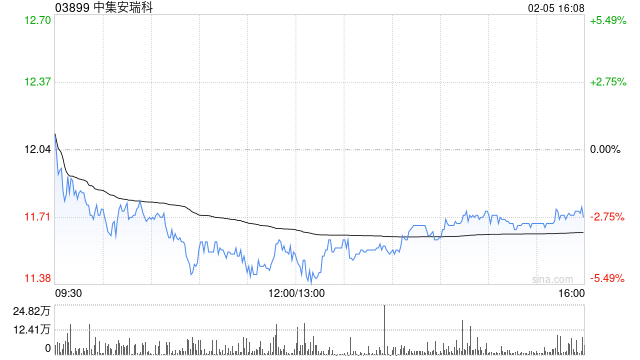 小摩:料中集安瑞科印尼项目最多贡献7,000万人民币利润 予“增持”评级2026-02-05 阅读(1)
 -
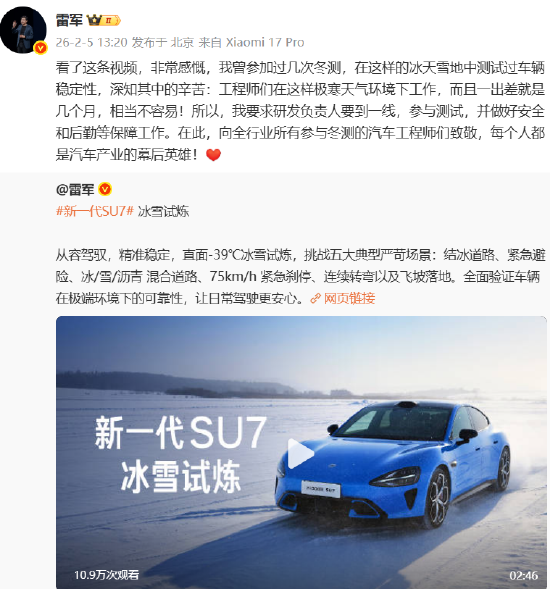 雷军:向全行业所有参与冬测的汽车工程师致敬2026-02-05 阅读(1)
 -
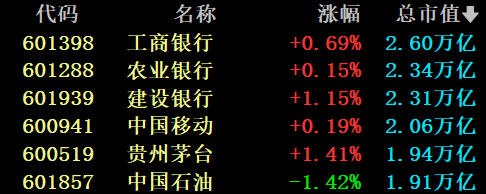 贵州茅台,重回市场“C位”2026-02-05 阅读(1)
 -
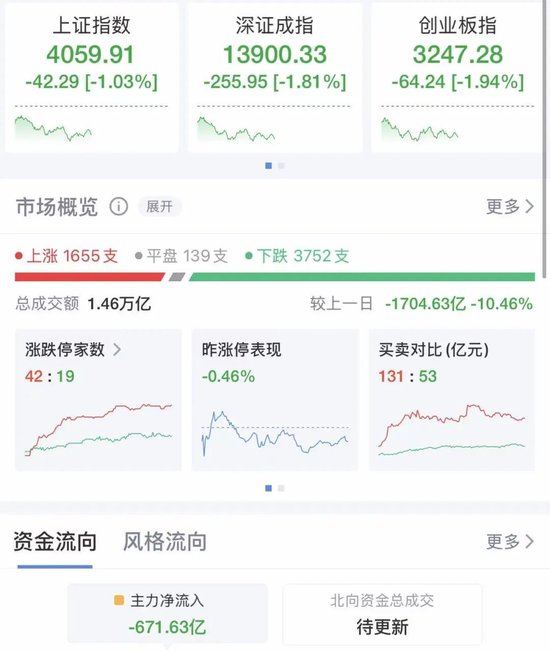 A股震荡回调,三大指数均跌超1%,超3600股下跌,黄金股集体跳水!大消费爆发,影视股大涨,银行股拉升2026-02-05 阅读(1)
 -
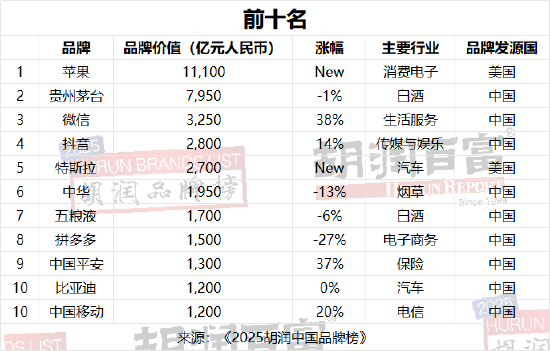 2025胡润中国品牌榜:苹果登顶,贵州茅台第二、微信第三2026-02-05 阅读(1)
 -
 美联储内战升级!理事放鹰捍信誉,白宫施压意降息,美元何去何从?2026-02-05 阅读(1)
-
 如何设置Win 7通知栏重新显示电源按钮2001-12-01 阅读(43)
 -
 windows 7查看电脑近期使用情况确定有没有被他人使用2002-01-01 阅读(43)
 -
 ubuntu14.04打开个几个应用窗口最小化后怎么切换呢?2002-01-01 阅读(38)
 -
 windows 7 xp宋体 成功替换windows 7宋体为XP宋体的方法2002-02-01 阅读(45)
 -
 windows 7启动后检测到硬盘出错提示请立即备份文件2002-02-01 阅读(31)
 -
 去掉电脑右下角出现windows 7测试模式内部版本7601的方法2002-02-01 阅读(35)
 -
 怎么找出藏在windows 7中的Windows Mail2002-02-01 阅读(36)
 -
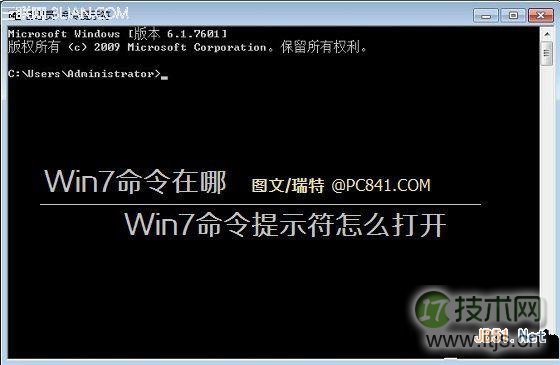 怎么有效的解决windows 7系统的命令提示符打开2002-02-01 阅读(32)
-
 Windows7安装Solr+Tomcat的方法2010-05-01 阅读(215)
 -
 windows 7下先装SQL2005后装SQL2000 正确连接方法2010-10-01 阅读(143)
 -
站长需要掌握的知识与技能2025-10-13 阅读(114)
-
 马斯克:特斯拉2024年AI投资百亿,FSD 安全水平将超过人类2025-03-21 阅读(104)
 -
 H5项目调用微信授权并实现登录功能2025-10-13 阅读(97)
 -
 OpenStack 入门教程2015-05-14 阅读(94)
 -
 华为称已准备好取代谷歌应用:有10亿美元全球基金2019-12-25 阅读(93)
 -
 西部数据WD 25年第三季度财报:营收为 22.9 亿美元,环比下降 5%2025-05-02 阅读(90)
- 随机文章



- 热评文章
- 最近评论
-
